Example · Analytical robustness
996102e0
Specification curve example
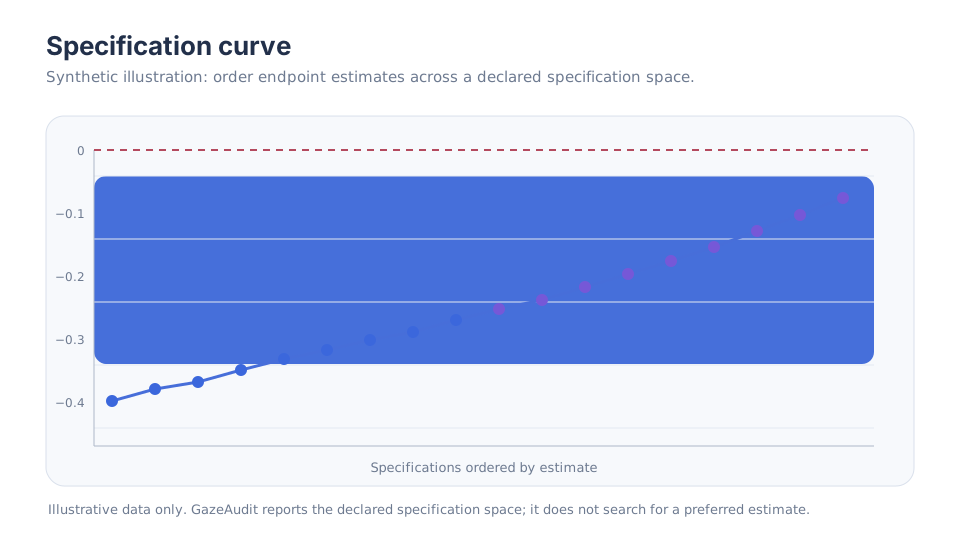
This example starts after a set of defensible specifications has been executed. It uses synthetic estimates so the robustness summary can be understood independently of any empirical case study.
Create a synthetic results table
import pandas as pd

results = pd.DataFrame(
    {
        "spec_id": range(12),
        "detector": ["ivt", "ivt", "ivt", "ivt", "ivt", "ivt",
                     "idt", "idt", "idt", "idt", "idt", "idt"],
        "qc": ["moderate", "moderate", "strict", "strict", "moderate", "strict"] * 2,
        "aoi_mode": ["hard", "probabilistic", "hard", "probabilistic",
                     "probabilistic", "hard"] * 2,
        "estimate": [-0.31, -0.27, -0.34, -0.25, -0.28, -0.33,
                     -0.22, -0.19, -0.24, -0.17, -0.20, -0.23],
    }
)
The values are illustrative. They are not taken from the Korthals validation case or any other frozen result.
Order the specifications by estimate
from gazeaudit import specification_curve

curve = specification_curve(results)
print(curve[["spec_id", "detector", "qc", "aoi_mode", "estimate"]])
specification_curve() uses a stable sort so the ordered table remains deterministic when estimates tie.
Summarise effect stability
from gazeaudit import effect_stability

stability = effect_stability(results, null=0.0)
print(stability)
The result includes:
n_specifications;- mean and median estimates;
- minimum and maximum;
- 2.5% and 97.5% empirical quantiles;
- positive, negative, and exact-null fractions;
sign_stability, defined descriptively as the largest of those three fractions.
In this synthetic table every estimate is negative, so direction is stable even though magnitude varies.
Screen marginal sensitivity
from gazeaudit import marginal_sensitivity

marginal = marginal_sensitivity(
    results,
    factors=["detector", "qc", "aoi_mode"],
)

print(marginal)
marginal_eta2 compares between-level sum of squares with total endpoint sum of squares. It is an auditable screening diagnostic, not a causal variance decomposition.
Screen pairwise interactions
from gazeaudit import pairwise_interaction_sensitivity

pairwise = pairwise_interaction_sensitivity(
    results,
    factors=["detector", "qc", "aoi_mode"],
)

print(pairwise)
For each factor pair, GazeAudit compares cell means with the additive prediction mean(A) + mean(B) - grand_mean and reports a descriptive interaction-sensitivity ratio plus the maximum absolute interaction deviation.
Interpretation discipline
A useful robustness interpretation separates three questions:
- Direction: does the sign change across defensible specifications?
- Magnitude: how wide is the range of estimates even when sign is stable?
- Source: which declared factors or factor combinations are most associated with that variation?
Do not collapse these into one universal “robust/not robust” threshold unless the threshold was justified and declared for the study.
Recreate the example from a PipelineSpace
In a full analysis, results would usually come from run_specs():
from gazeaudit import PipelineSpace, run_specs

space = (
    PipelineSpace()
    .add_choice("detector", ["ivt", "idt"])
    .add_choice("qc", ["moderate", "strict"])
    .add_choice("aoi_mode", ["hard", "probabilistic"])
)

# results = run_specs(
#     study,
#     space,
#     endpoint=endpoint_function,
#     processor=processor_function,
# )
The endpoint and processor are intentionally study-specific. GazeAudit provides the auditable specification machinery rather than deciding what your scientific endpoint should be.
Next
Use the specification-space guide to design the decision space or the robustness audit workflow to structure the full analysis.