Example · Complete workflow
996102e0
End-to-end robustness audit
This is the copy-ready researcher workflow for GazeAudit. It starts with a canonical GazeStudy, declares three defensible analytical choices, executes every specification against one common endpoint, and finishes with stability and factor-sensitivity summaries.
The complete executable script is examples/end_to_end_robustness.py.
What this example audits
The synthetic study has 12 participants, four trials per participant, 60 gaze-like samples per trial, and two conditions. The endpoint is treatment minus control AOI occupancy around a circular region centred at (0.50, 0.50).
Three analysis decisions are varied deliberately:
| Decision | Levels | Why it can matter |
|---|---|---|
| minimum sample quality | 0.70, 0.80 |
stricter QC changes which observations survive |
| sample stride | 1, 2 |
retaining every sample versus every second sample changes temporal resolution |
| AOI radius | 0.16, 0.20, 0.24 |
a spatial boundary changes which coordinates count as inside |
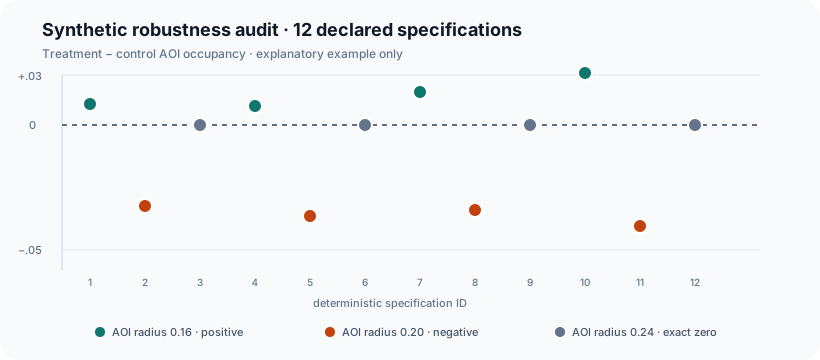
This produces 12 specifications. The purpose is not to find the “best” one. The purpose is to expose how the scientific endpoint behaves across the complete declared decision space.
1. Install and import
python -m pip install "gazeaudit==0.2.0"
import numpy as np
import pandas as pd

from gazeaudit import (
    GazeStudy,
    PipelineSpace,
    effect_stability,
    marginal_sensitivity,
    pairwise_interaction_sensitivity,
    run_specs,
    specification_curve,
)
2. Build deterministic synthetic gaze data
rows = []
for participant in range(1, 13):
    for trial in range(1, 5):
        condition = "treatment" if trial % 2 == 0 else "control"
        shift = 0.035 if condition == "treatment" else 0.0

        for sample in range(60):
            phase = sample + participant * 3 + trial
            rows.append(
                {
                    "participant": f"P{participant:02d}",
                    "trial": trial,
                    "timestamp": sample / 60.0,
                    "x": 0.50 + shift + 0.16 * np.sin(phase / 7.0),
                    "y": 0.50
                    + 0.14 * np.cos((sample + participant + trial * 2) / 9.0),
                    "condition": condition,
                    "quality": 0.65
                    + 0.35
                    * (((sample * 17 + participant * 13 + trial * 7) % 101) / 100.0),
                }
            )

data = pd.DataFrame(rows)
study = GazeStudy(data)
study.validate_time_order()
GazeStudy stores the original table together with the semantic mapping for coordinates, time, participant, and trial. The package does not require a vendor-specific export schema.
3. Declare the specification space before inspecting results
space = (
    PipelineSpace()
    .add_choice("min_quality", [0.70, 0.80])
    .add_choice("sample_stride", [1, 2])
    .add_choice("aoi_radius", [0.16, 0.20, 0.24])
)

print(space.size)
# 12
The declared levels should be scientifically defensible alternatives, not a search grid chosen after seeing which estimate looks preferable.
4. Define one processor for the declared choices
def process_specification(study, spec):
    frame = study.data.copy()
    frame["sample_rank"] = frame.groupby(
        [study.participant, study.trial], sort=False
    ).cumcount()

    keep = (frame["quality"] >= float(spec["min_quality"])) & (
        frame["sample_rank"] % int(spec["sample_stride"]) == 0
    )

    return study.copy_with(frame.loc[keep].drop(columns="sample_rank"))
The processor changes only the decisions that were explicitly declared. In a real study this is where detector choice, QC rules, missing-data handling, AOI definitions, or preprocessing branches would usually enter.
5. Define one common scalar endpoint
def condition_aoi_occupancy_effect(processed, spec):
    radius = float(spec["aoi_radius"])
    frame = processed.data

    inside = (
        (frame[processed.x] - 0.50) ** 2
        + (frame[processed.y] - 0.50) ** 2
        <= radius**2
    )

    by_condition = (
        frame.assign(in_aoi=inside)
        .groupby("condition", sort=False)["in_aoi"]
        .mean()
    )

    return float(by_condition["treatment"] - by_condition["control"])
Every specification must return the same scientific quantity. If different branches answer different questions, combining them into one specification curve is not meaningful.
6. Execute every specification
results = run_specs(
    study,
    space,
    endpoint=condition_aoi_occupancy_effect,
    processor=process_specification,
)

print(results)
run_specs() returns one row per valid specification with its decision columns, deterministic spec_id, and scalar estimate.
7. Order the specification curve
curve = specification_curve(results)
print(curve[["spec_id", "min_quality", "sample_stride", "aoi_radius", "estimate"]])
Ordering by estimate makes the range visible without selecting a preferred branch.
8. Summarise stability
stability = effect_stability(results)
print(stability)
For this deterministic demonstration, the 12 estimates contain positive, negative, and exact-zero values. That is intentionally useful: it shows why a researcher should inspect direction, magnitude, and the source of variation rather than report only one pipeline.
Important interpretation boundary: the 2.5% and 97.5% values returned by effect_stability() are empirical quantiles across declared specifications. They are not confidence intervals and not posterior credible intervals.
9. Identify which decisions drive variation
factors = ["min_quality", "sample_stride", "aoi_radius"]

marginal = marginal_sensitivity(results, factors=factors)
print(marginal)

pairwise = pairwise_interaction_sensitivity(results, factors=factors)
print(pairwise)
marginal_eta2 is a descriptive between-level screening measure. It is not a causal variance decomposition and factor values do not need to sum to one.
The pairwise interaction ratio compares observed cell means with an additive expectation. It is a diagnostic of non-additive specification sensitivity, not a replacement for a fitted factorial inferential model.
10. Report the audit, not just a favourite specification
A compact reporting structure is:
- define the common endpoint;
- list every decision factor and level before interpreting results;
- state how invalid combinations were excluded, if any;
- report the number of evaluated specifications;
- report the estimate range, empirical specification quantiles, and sign fractions;
- identify the factors most associated with variation;
- explain whether the scientific conclusion is stable, magnitude-sensitive, direction-sensitive, or unresolved under the declared space.
Use the reporting robustness guide for manuscript-oriented wording and the reproducible publication workflow when the final audit needs fingerprints and deterministic evidence bundles.
Run the repository script
From a clone of the repository:
python examples/end_to_end_robustness.py
The script prints the full specification table, stability summary, marginal sensitivity table, and pairwise interaction diagnostics. It performs no file writes and uses no network access.
What changes in a real study
Replace the synthetic data generator with your canonical study input, replace the demonstration QC and AOI choices with your defensible alternatives, and replace the occupancy difference with your prespecified endpoint. The PipelineSpace → run_specs → specification_curve → effect_stability → sensitivity structure can remain unchanged.
Next
- Specification-space guide — how to decide what belongs in the multiverse.
- Reporting robustness — how to describe the results without overclaiming.
- Robustness audit workflow — how this example fits into a study-level analysis plan.